Intuit is really pushing new and existing Quickbooks users to go use their Online version of Quickbooks.
While I like Quickbooks Online and it’s features, I do not feel that it is a good fit for all businesses. Before you jump the gun and move to Online you really need to look at whether this is a good fit for your business bookkeeping.
A New Program
QuickBooks Online (QBO) is a different program than the desktop version (as you can see from the screenshot below), there is a different user interface and there is a learning curve when you first use it.
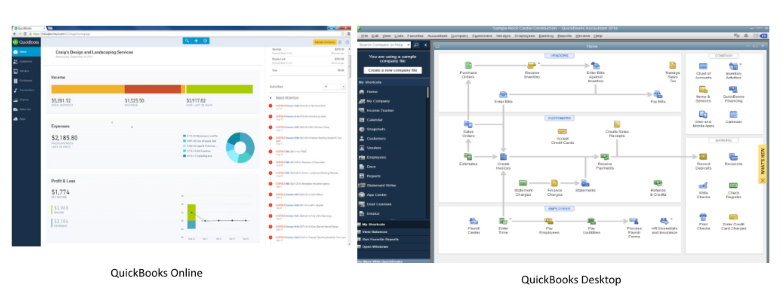
This isn’t necessarily a bad thing, but don’t go head first in expecting everything to look and work just like the desktop version.
No Backups
One thing a number of people keep bringing up to me is that there is no backup file to save. This is correct, the data is stored in the “cloud”. The cloud is basically servers that make up the Internet. Intuit handles the servers and backups the data for you as part of their service agreements.
If you decide to move from Online to another version or program, you will not be able to get the data off. The best you can do is print off the GL, or export it to an excel file.
Problems Within Online
There are still some bugs on the Online version, just like there is with the Desktop version. Intuit is constantly upgrading the Online experience, which is a good thing, and sometimes these bugs are fixed.
There are other times where you need to contact support to make a correction, for example if you make a mistake with your payroll and process a cheque, you will need to contact Support to make the correction for you.
Good Things with Quickbooks Online
Let’s talk about some of the good things now, since this seems to be a negative position I am taking, which is not my opinion.
First, the fact the you can access you data anywhere you have the Internet working is a big plus. You can work on your books at your office and continue working at home or elsewhere with your laptop. I know a number of people who say this is the best best feature, and I agree.
You can also have your accountant access your data for you and make corrections or get the information for your taxes. Currently, most plans allow you to add two “Accountant” users to your books.
This is another great feature for someone like myself, who offers bookkeeping services. I can take full control of a set of books from anywhere, or even just provide support for reconciliations, returns or journal entries.
Downloading bank and credit card transactions works very well with QBO, which is another great feature. Once you connect your bank to QBO it will seamlessly download them and have it ready for you to post when you login.
Once you start posting the transactions, it will remember what you posted in the past and make suggestions or match them with invoices and bills, which is a great time saver.
What Kind of Businesses Should Use QBO
After using QBO for over two years for clients and discussing it with other users and professionals, if you are a business that needs to manage and track Inventory such as a manufacturing plant, this is not the program to use.
As well, if you have a number of hourly employees, or even salaried employees, this is not for you.
You could use another program to manage inventory and employees if you wish and use QBO to manage sales, purchases and the bank accounts but you would be doing extra work using a second program.
Ideally, if you are a service business, or a very small home/hobby business this could work out very well for you. If you don’t have a strong staff member doing your books and need a third party working on them remotely, again this could be the best fit.
Some examples could be a freelance graphic designer, a sub contractor who has a number of contractors working for them or a professional such as a doctor.
Take your time before you decide to move to QBO, speak with your bookkeeper and/or accountant and get their opinion as well. QBO can be a great program to use for the right business. But once you move it is not easy to go back to the desktop.
If there are other areas I failed to mention – please contact me to discuss them.